

Know the car before you pay for it.
CarCheckup walks you through a used car step by step — documents, body, interior, engine, cold start and test drive. Take the photos it asks for, answer what you see, and get a report with a verdict, questions for the seller and points to negotiate.
Coming to the App Store and Google Play. AI reports are free during the pilot.
Have a workshop check the head gasket before paying. The front-left side was repainted — ask about accidents.
The usual traps of a UAE used car — and how the checklist catches them
Auction imports sold as clean
US and Canada imports are often rebuilt after crashes or floods. The spec step flags them and tells you to check the VIN history.
Flood damage
Smell, silt under the carpets and in the spare-wheel well, stained seat belts. Two of these and the report says so.
Mileage that doesn’t match
The odometer is compared with the last service record and with the wear of the wheel, pedals and seat.
Papers that don’t add up
The VIN on the body against the Mulkiya, the owner against the seller, and a bank lien that has to be cleared first.
Fines and transfer blocks
Unpaid fines or a police block on the car mean the transfer won’t go through. The seller shows it in the RTA or Dubai Police app.
Heat damage
Sun-cracked tyres and dashboards, old tyres by their DOT date — each a point to negotiate.
Three steps, at the seller’s place
Enter the car
Type the VIN or photograph the plate — the app reads and decodes it. Make, model, year and engine size bring the known weak spots of that exact car into the checklist.
VIN from a photoGo through the checklist
Each step shows where to look on a drawing of the car. Photograph, record the engine at cold start, and answer: fine, not sure, or a problem. Works offline; tap to focus, and a wide 0.5× lens for the engine bay where the phone has one.
Works offlineGet the report
A report from your answers right away, as a PDF to keep or send. The AI adds a verdict, reads every photo, and writes questions for the seller and what to negotiate.
PDF in English or RussianFrom the first step to the verdict
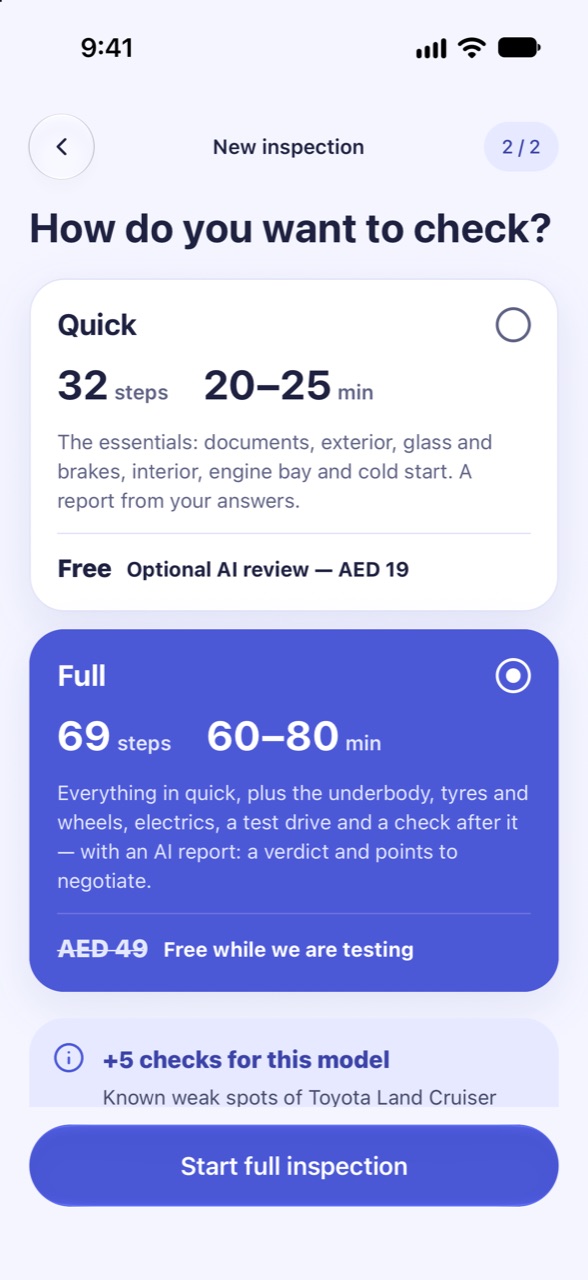
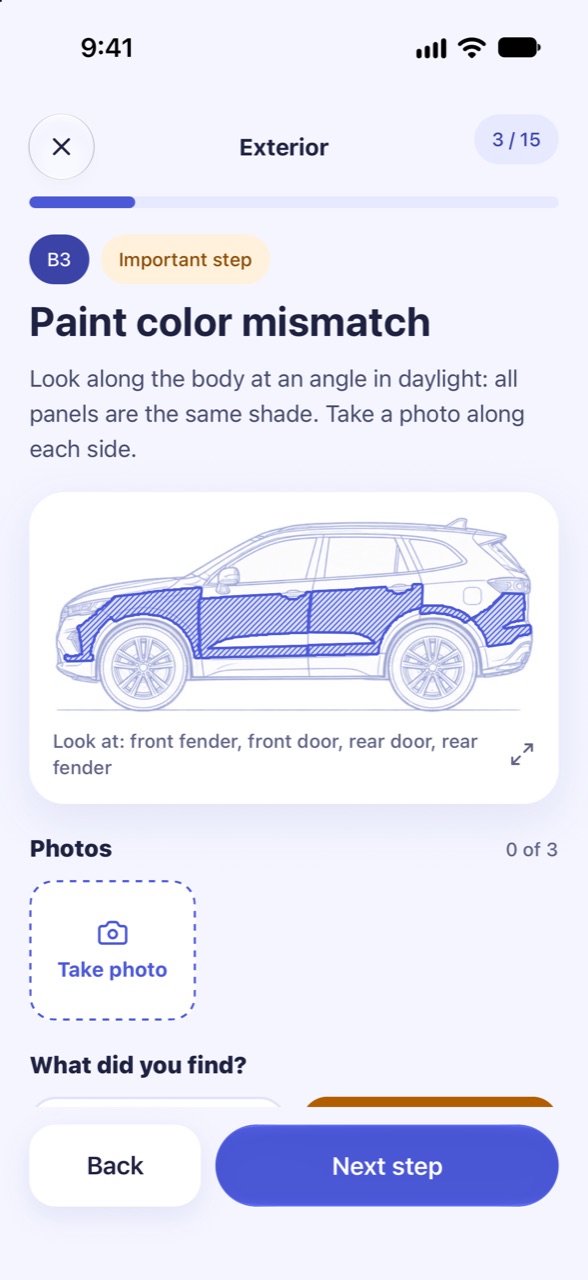
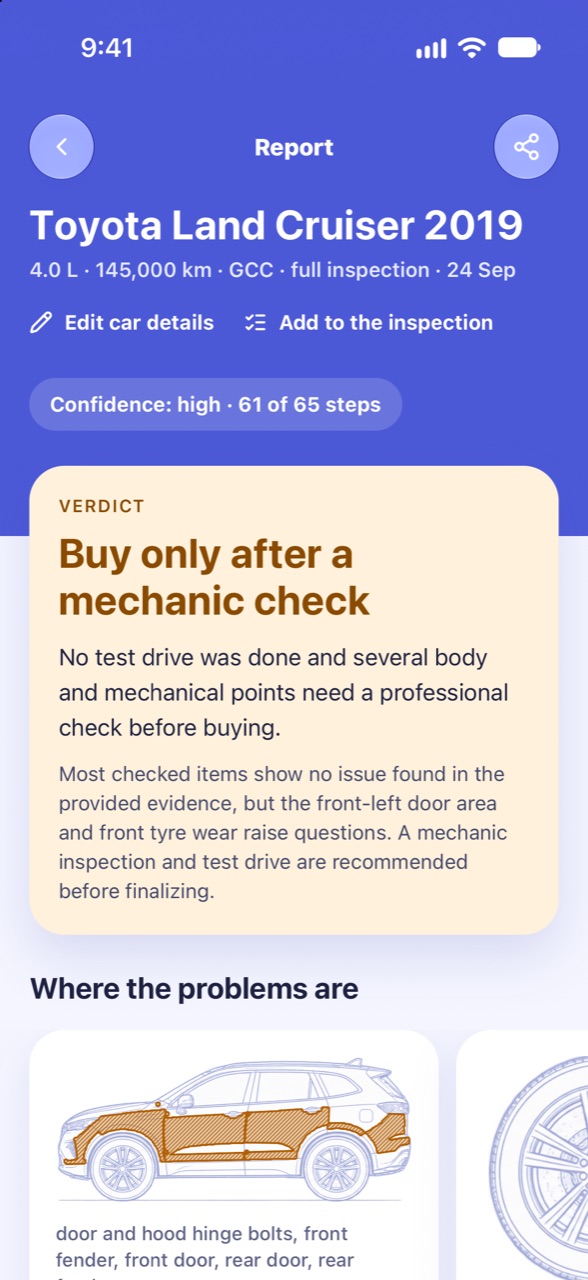
Real screens of a sample full check of a 2019 Land Cruiser.
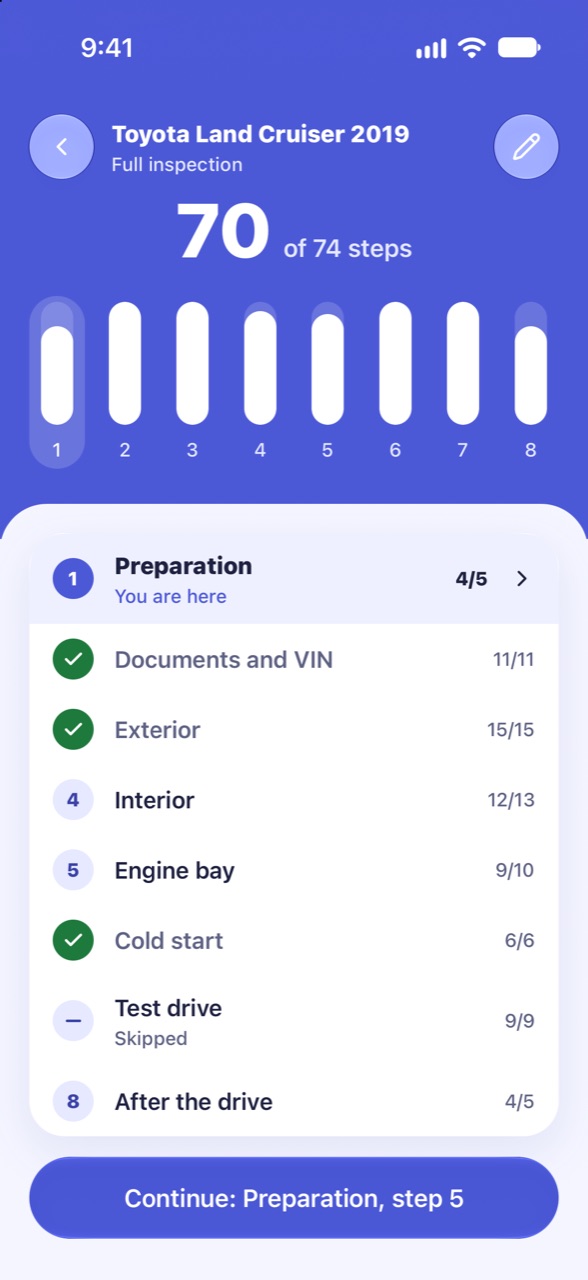
Eight stages, from the phone call to after the drive
Written for UAE cars and conditions: GCC or import, Mulkiya, RTA fines, heat and sand. Open a stage to see every step.
1 PreparationDone at home, before you meet the seller. 5 steps
- Engine stays cold before the viewingImportant
Ask the seller not to start the engine for at least 3–4 hours before the viewing: a warm engine hides some problems.
- Mulkiya and VIN photo in advanceImportant
Ask the seller for a photo of the Mulkiya and the VIN in advance, then check the VIN in the app.
- Questions to the seller by phoneImportant
Ask by phone about accidents, repainting and flooding, where the car was serviced and why it is being sold. Write down the answers.
- Right conditions for the viewing
Schedule the viewing in daylight, on a dry, level surface and not right after a car wash.
- What to bring
Bring a torch, paper towels, gloves and a charged phone; a paint thickness gauge if you have one.
2 Documents and VINLegal problems are the most expensive: no repair can fix them. If the VIN does not match, it is best to stop the inspection. 10 steps
- Body VIN matches the MulkiyaCritical
Find the VIN on the body — under the windshield and on the door pillar — and compare it with the Mulkiya.
- Seller is the ownerCritical
Photograph the whole Mulkiya once: this photo is used for the owner and the bank lien (next step). The owner in the Mulkiya is the seller, or the seller has a power of attorney.
- No bank lienCritical
On the Mulkiya you photographed in the previous step, check for a bank lien mark. If the car is under a loan, ask how the seller will pay it off.
- Spec: GCC or importImportant
Determine the spec from the sticker or documents: GCC or import (USA, Canada, Japan, etc.).
- Odometer readingImportant
Enter the odometer reading and compare it with the last service record.
- Service historyImportant
Check for service history: dealer records, a service book or receipts.
- Number of owners
Find out how many owners the car has had.
- Number of keys
How many keys the seller hands over. Normal is 2.
- Build date matches the documents
The build date on the door-jamb plate matches the year in the documents.
- No fines or transfer blocksImportant
Ask the seller to show in the RTA or Dubai Police app (or the police site of their emirate) that the car has no unpaid fines and no blocks. With them, the transfer will not go through.
3 ExteriorThe main goal is to find signs of accidents and repainting. Photos from this stage are the main input for the analysis. 15 steps
- Overall view
Take 4 diagonal photos from 3–4 m away: front left, front right, rear left, rear right.
- Panel gapsImportant
Gaps between the hood and fenders, doors and trunk are even on both sides. Photograph each side.
- Paint colour mismatchImportant
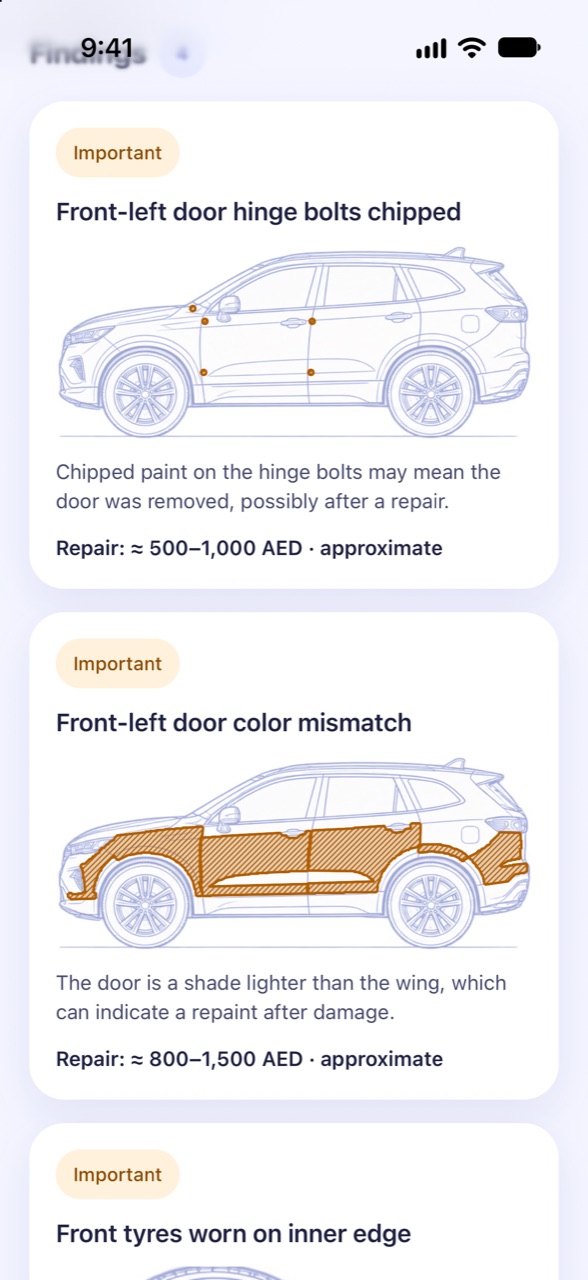
Look along the body at an angle in daylight: all panels are the same shade. Take a photo along each side.
- Signs of repaintingImportant
Look for runs, dust in the clear coat, and paint on seals and plastic trim.
- Hinge boltsImportant
Check the hinge bolts of the doors, hood and trunk: chipped paint means they were removed.
- Dents, scratches, chips
Check the body for dents, scratches and chips.
- Rust and bubbling
Check the sills, wheel arches and door bottoms for rust and bubbling paint.
- Glass: cracks and chips
Windshield, side and rear glass have no cracks or chips. The year on the glass markings is the same everywhere: a different year means that glass was replaced. Photograph the windshield.
- Headlights and tail lights
Headlights and tail lights have no cracks or condensation; left and right match.
- Tyre wearImportant
All tyres wear evenly, with no heat cracks on the sidewalls. Photograph each tyre.
- Tyre date (DOT)Important
Find the 4-digit DOT code on each tyre's sidewall: the first two digits are the week, the last two the year. Photograph the codes and enter the year of the oldest tyre.
- Wheels
Wheels have no impact damage or cracks, and all four match.
- Exterior rubber and plastic
Seals and exterior plastic show no sun cracking.
- UnderbodyImportant
Inspect the underbody with a torch: no impact damage, leaks or welding marks.
- Brake discsImportant
Shine a torch through the wheel spokes: no deep grooves on the discs, no high lip at the edge, no heavy rust.
4 InteriorLook for signs of flooding and wear that does not match the mileage, and check the A/C. 11 steps
- Cabin smellCritical
No damp or mould smell, and no overpowering air freshener.
- Under the mats and in the spare wheel wellCritical
Lift the floor mats and the trunk floor by the spare wheel: no moisture, silt, sand or rust on fasteners. Photograph the floor and the spare wheel well.
- Seat beltsCritical
Pull the belts all the way out: no stains or dirt marks on the webbing.
- Wear matches the mileageImportant
Wear on the steering wheel, gear lever, pedals and driver's seat matches the mileage. Photograph the steering wheel and pedals.
- Warning lights at ignitionCritical
Turn on the ignition: all warning lights (Airbag, ABS, Check Engine) come on and then go off. Photograph the dashboard.
- Air conditioningImportant
Turn on the A/C: the air is cold within 2–3 minutes, with no smell or noise.
- Electrics
Check the windows, mirrors, locks, infotainment, camera and parking sensors.
- Headliner and pillarsImportant
No stains on the headliner and pillars, and no signs the trim was removed.
- Dashboard
No cracks or sun fading on the dashboard.
- Overall interior condition
Seats, upholstery, steering wheel, headliner and trim: wear, burns, stains, smell of smoke; seat adjustment, heating or ventilation work. Photograph the cabin through the open doors.
- Airbag coversImportant
The airbag covers on the steering wheel, dashboard and pillars sit flush, match in colour and texture, with no signs of being opened or glued. A replaced cover is a sign of an accident with deployed airbags.
5 Engine bayInspect with the engine cold, before starting it: signs of major repair, leaks and head gasket problems. 10 steps
- Engine is coldImportant
Touch the hood and the engine block: they should be cold. If the engine is warm, mark it as a problem.
- Engine bay overview
Take 1–2 overview photos of the engine bay.
- Engine oilCritical
Check the oil level and colour on the dipstick; there is no light-coloured sludge under the oil filler cap. Photograph the dipstick on a paper towel and the cap.
- CoolantCritical
The level in the reservoir is normal, the colour is clean and there is no oil film. Photograph the reservoir.
- LeaksImportant
No oil or fluid leaks on or under the engine.
- Signs of structural repairCritical
Look for mismatched paint, fresh sealant on seams and non-original bolts on the front panel and chassis rails.
- Belts and hoses
Belts and hoses have no cracks or chafing.
- Battery
Check the date on the battery case and look for corrosion on the terminals.
- Automatic transmission fluidImportant
If the transmission has a dipstick, check the fluid colour on a paper towel and whether it smells burnt.
- Engine bay not freshly washed
A suspiciously clean, freshly washed engine bay can hide leaks.
6 Cold startThe first seconds after a cold start reveal what warming up hides. Best if the seller starts the engine while you stand by the open hood. 5 steps
- Start-up soundImportant
Ask the seller to start the engine while you stand by the open hood. Record the sound from the moment it starts, 30–60 seconds.
- Exhaust smokeImportant
Watch the exhaust in the first seconds: no blue, thick white or black smoke.
- Warning lights after startCritical
After start-up, all warning lights on the dashboard have gone off. Photograph the dashboard.
- IdleImportant
The engine runs smoothly, with no body or steering wheel vibration. Record 30 seconds of sound.
- Knocking during warm-upImportant
Listen during the first minutes of warm-up: no knocking or ticking. Record the sound.
7 Test driveRequires the seller’s permission and your right to drive the car. While driving, only sound is recorded; you answer after you stop. 8 steps
- Steering at standstillImportant
With the car stationary, turn the wheel fully left and right. Listen for knocks and squeaks.
- Pull-away and accelerationImportant
No jerks, slipping or delayed gear shifts.
- BrakingImportant
No vibration through the steering wheel or pedal, and the car does not pull to one side.
- Straight-line driving
On a straight, level road the car does not pull to one side.
- Speed bumpsImportant
Drive over speed bumps slowly: no suspension knocks.
- Speed 80+ km/hImportant
Only where it is legal and safe: at 80+ km/h there is no humming or vibration.
- A/C under loadImportant
The A/C keeps blowing cold air while driving.
- Full-lock turnImportant
No crunching or clicking when turning at full lock.
8 After the driveA warm car shows leaks and overheating. If there was no test drive, do this stage after 10 minutes of idling. 5 steps
- Leaks under the carImportant
After 5 minutes parked with the engine running or just switched off, there are no leaks under the car.
- Temperature and fanImportant
Engine temperature is normal and the radiator fan switches on. Photograph the dashboard.
- New warning lightsCritical
No new warning lights have appeared on the dashboard. Photograph the dashboard.
- Smell from the engine bayImportant
No burning, oil or coolant smell from under the hood.
- Overall impression
What worried you and what you liked about the car.
Plus the known weak spots of your make, model, year and engine — added to the checklist when you enter the car.
Start free. Pay for the AI report when you want it.
Pilot: AI reports are free for nowQuick check
- The essentials: documents, body, glass and brakes, interior, engine bay, cold start
- A report from your answers, with every photo, as a PDF
- Optional AI report: verdict, photos read, seller questions, negotiation
Full check
- Everything in quick, plus underbody, tyres and wheels, electrics, airbag covers
- Test drive with a recording, and a check on the hot engine after it
- The AI report with a verdict and confidence, ready in a few minutes
A verdict you can act on — and how sure it is
Verdict and confidence
Hard rules decide the ceiling — a VIN mismatch or flood signs can’t be outvoted. Confidence shows how much of the car was actually checked.
Every photo read
What each photo shows, where on the car, and why it matters — marked on a drawing of the car.
Questions for the seller
What to ask before you pay, including where the seller’s phone answers and the car disagree.
Points to negotiate
Worn tyres, old battery, cosmetic damage — each a reason to lower the price.
What to show a mechanic
A short list for the workshop, so a paid inspection goes straight to what worried you.
PDF in English or Russian
With the photos of every finding. Save it or send it to a friend, a mechanic or the seller.
The report is based on what you collect. It does not replace a workshop inspection: the engine, gearbox and electronics can’t be checked from the inside by photos.
Buying a used car in the UAE soon? Try it first.
We are testing CarCheckup with real buyers before the launch. Leave your email and we’ll send you an invite to the test version for iPhone.
- AI reports free during the pilot
- A direct line to the team if something goes wrong at the seller’s
- Your feedback shapes the checklist for UAE cars
Questions buyers ask
Buying a used car in the UAE
How do I check a used car before buying it in the UAE?
Start with the papers: the VIN on the car must match the Mulkiya, the owner must be the seller, and there must be no bank lien, unpaid fines or police block. Then the body in daylight (panel gaps, colour mismatch, overspray), the tyres and their DOT date, the interior for signs of a flood, and the engine from cold — ask the seller not to warm it up. Finish with a test drive and a look under the bonnet after it. CarCheckup’s quick check covers the essentials in 32 steps, the full check everything in 69.
GCC spec or import — what is the difference?
GCC-spec cars were built for the Gulf market and its heat. Imports, mostly from the US, Canada and Japan, are often cheaper, but many were sold at auction after an accident or a flood and rebuilt. Before buying an import, check its VIN history (for US and Canadian cars — Carfax or AutoCheck) and look harder at panel gaps and paint.
How can I tell if a car has been in a flood?
A musty smell or a very strong air freshener, silt or sand under the carpets and in the spare-wheel well, rust on the seat rails and bolts, water marks or condensation inside the lights, stains on a seat belt pulled out to the end, and electrics that act up. One sign is a reason to look harder; two or more — walk away or have a workshop check the car.
How do I know how old the tyres are?
Find the DOT code on the sidewall: its last four digits are the week and year the tyre was made — 1219 means week 12 of 2019. In the UAE heat tyres age faster than the tread wears, so check the date even when the tread looks fine; cracks in the sidewall mean they need replacing. Old tyres are a fair point to negotiate.
How much does a pre-purchase car inspection cost in the UAE?
A workshop or a mobile inspector usually charges a few hundred dirhams. With CarCheckup the quick check is free, with an optional AI report for AED 19, and the full check with the AI report is AED 49. The app does not replace a workshop: it helps you decide which car is worth taking to one and what to ask them to check.
About the app
Do I still need a mechanic?
For the inside of the engine and gearbox — yes. CarCheckup helps you decide whether a car is worth taking to one, and what to ask them to check.
How long does it take?
About 20–25 minutes for the quick check and 60–80 for the full one with a test drive. You can stop and continue later.
Does it work without internet?
Yes. The checklist, photos and recordings are saved on the phone and upload by themselves when you’re back online. The AI report needs a connection.
Which cars does it work for?
Any passenger car. The weak spots are looked up for your make, model, year and engine size.
Where do my photos go?
They stay in the inspection on your phone and, if you like, in your phone’s Photos at full quality. For the AI report, compressed copies without location data are sent securely to our servers.
Can I delete my data?
Yes: delete an inspection, or the whole account in Profile → Delete account. Both remove the data from the phone and from our servers.
Your inspections are yours
Privacy policy — full text
Last updated: date · Applies to the CarCheckup mobile app and the pilot sign-up form on carcheckup.ae.
Who we are
CarCheckup is operated by company name, address, country. Questions about this policy or your data: [email protected].
What the app collects
What you enter about the car. VIN, make, model, year, mileage, price, the link to the listing, your answers to the checklist steps and your notes.
Photos and sound recordings you take in the app. Photos are resized on your phone and re-encoded before upload, so the location and other EXIF data from the camera are not kept.
Your account. The app works without an account: it creates an anonymous account on first use. If you sign in, we store your email address. We never store passwords: sign-in uses a one-time code sent to your email.
Notifications. If you allow notifications, the app stores a push token for that device, to tell you when a report is ready.
Language. The interface language you chose, to write the report in the same language.
Your answer about a report. If you answer the short question under a report (did it help you decide), we store the answer with that inspection. They are deleted together with the inspection or the account.
Copies in your photo library. If «Save photos to the gallery» is on (Profile), the app also saves each inspection photo to your phone's photo library. It only asks to add photos and never reads your library for this. Those copies stay on your phone; deleting an inspection or the account does not remove them.
Usage and error data. App events (for example «inspection started», «report opened», with the inspection mode and counts — never the car, photos, answers or your email), linked to a random device id or, once you sign in, to your account id; and crash reports. They help us understand how the app is used and fix errors.
The app does not collect your location, contacts, health data or payment details, and does not use advertising identifiers.
Why we use it, and on what basis
- To run the inspection and produce the report — performance of our contract with you.
- To keep your inspections across devices when you sign in — performance of our contract.
- To notify you when a report is ready — your consent (you can turn notifications off in the system settings).
- To keep the service working and safe (error diagnostics, abuse prevention) — our legitimate interest.
How the report is produced
The answers, notes and photos of one inspection are sent to Anthropic (Claude API) to produce the report. Anthropic processes them to return the result and, under its commercial terms, does not use them to train its models. We send only inspection data: no email address, no account identifier.
The report is a summary of what you collected. It is not a technical inspection and does not replace a workshop check.
Pilot sign-up on the website
If you join the pilot on our website, we keep your email, your phone type (iPhone or Android), when you plan to buy a car, the site language and where you came from (for example, the link or ad), to send you an invite to the test version and to write to you about the pilot. Against spam we keep a one-way hash of your IP address, not the address itself. This is stored with Supabase (see below) and deleted when the pilot ends, or earlier if you ask at [email protected].
Who else processes the data
| Processor | What for | Where |
|---|---|---|
| Supabase | database, file storage, sign-in | ap-northeast-2, Seoul, South Korea |
| Anthropic (Claude API) | producing the report | United States |
| Expo (Expo Application Services) | delivering push notifications | United States |
| PostHog | usage events | EU / United States |
| Sentry | crash and error reports | EU / United States |
| Resend | sending sign-in codes by email | United States / EU |
Data may be transferred outside the UAE to the countries above. We rely on the processors' contractual safeguards (standard contractual clauses or equivalent). Confirm with counsel which transfer basis applies under the PDPL.
How long we keep it
- Inspections, photos, recordings and reports: until you delete them or delete your account.
- Deleting an inspection in the app removes it from the phone and from our servers.
- Deleting the account removes every inspection, file and report, and the account itself. Backups are overwritten within 30 days.
- Logs of AI calls (model, cost, time, and the account id for the daily limit; no photos or inspection content) are kept for 12 months. Deleting the account removes the link to it.
Your rights
You can ask us to access, correct, delete or export your data, to restrict or object to processing, and to withdraw consent. Deleting the account does most of this in the app: Profile → Delete account. For anything else write to [email protected]; we answer within 30 days. You can also complain to the UAE Data Office.
Children
The app is not meant for people under 18 and we do not knowingly collect their data.
Security
Data is encrypted in transit (HTTPS) and at rest by our hosting provider. Each account can only read its own inspections (row-level security). The Claude API key is kept on the server and never ships inside the app.
Changes
We will post changes here and, if they matter to you, tell you in the app before they take effect.
Questions, a bug, or a car that stumped the checklist?
Write to us — we reply by email within 1 working day.